


cabsme
Members
-
Joined
-
Last visited
-
-
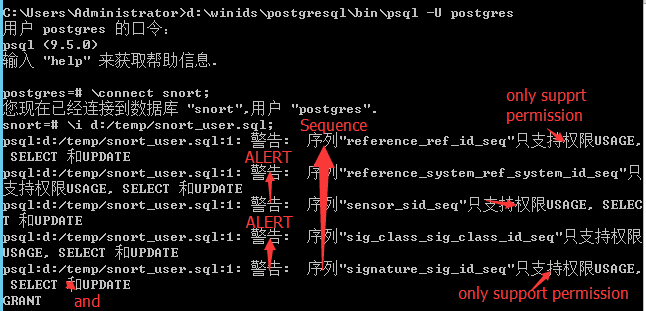
cabsme replied to cabsme's topic in Discussing Manual Installation for Apache2 with PostgreSQL LoggingI had encounted none of error during the whole installation ,except FIVE WARNING in the step on " Creating the Windows Intrusion Detection System Database Tables " ,after i typed the command: \i d:/temp/snort_user.sql; " was that the ROOT REASON? If so, how to solve? it not,how can i do? sorry for the CHINESE charactor, i had tried my best to translated...... you can receive my best wishes from CHINA!
-
cabsme replied to cabsme's topic in Discussing Manual Installation for Apache2 with PostgreSQL Loggingafter reboot, i got this error as attach
-
cabsme replied to cabsme's topic in Discussing Manual Installation for Apache2 with PostgreSQL LoggingBTW, i had been changed as follow under the guide: $alert_dbname = 'snort'; $alert_host = 'winids'; $alert_port = ''; $alert_user = 'base'; $alert_password = 'an@l1st';
-
hey, thanks for the guide. i closely completed my installation,except the last step: Starting the Windows Intrusion Detection Systems (WinIDS) Security Console when i opened a web-browser and type 'http://winids' ", it shows DATABASE ERROR as bellow: Error (p)connecting to DB : snort@winids Check the DB connection variables in base_conf.php = $alert_dbname : MySQL database name where the alerts are stored = $alert_host : host where the database is stored = $alert_port : port where the database is stored = $alert_user : username into the database = $alert_password : password for the username Database ERROR:Database connection failed May somebody pls kindly give some support? thank u!
-