
Morpheus
Administrators
-
Joined
-
Last visited
Everything posted by Morpheus
-
It appears there is a networking issue somewhere. I unsure what the problem could be. If you have setup the test rules and are still not seeing events in the Windows Intrusion Detection Systems (WinIDS) security console then there is a blockage somewhere? You have a custom install which makes it difficult to trouble shoot. Scripts need converted and a LOT of paths needs to be changed. It appears the tutorial is working but there its not detecting network traffic. The test rules will detect all network traffic. If you open the browser and it things are happening that traffic will be logged as an event and sent through to the console.
-
There could be several reasons why there are no events being displayed. The WinIDS is plugged into a switch and cannot see all the traffic. The HOME_NET is not set correctly There are actually NO events being triggered If you believe the above are not causing problems. Manually add rules to detect on specific packets and log.
-
I'm out of suggestions? Might try looking for the error through Google and see if something there helps.
-
It won't hurt to run it again. It could take up to 10 min. to automatically reboot. Don't intervene.
-
Did you run the modder.vbs file, and allow it to reboot by itself?
-
Zip up everything in the \inetpub\logs\LogFiles folder and attach.
-
I only found one small item. I'm not sure because it appears that PHP is working because the test.php file runes as expected. You might try renaming the base folder, extracting the base program using administrator privileges, extract the signatures to the base folder per the tutorial, and copy the new config to the base folder. base_conf .php
-
Attach the base_conf.php file.
-
What happens when you type from the URL: http://winids/base_main.php
-
At this point in the tutorial you should be finished. To test php at this point the test.php file needs to be copied to the d:\winids\inetpub\wwwroot\base\ folder. From the URL type: http://winids/test.php What kind of response are you getting?
-
The majority of MySQL commands end with a ; Follow the tutorial carefully.
-
Yes, bypass that if it's not installed it will create an error later on. I'll see if I can find a command to run that will verify its actually installed. 2008 may install it by default.
-
I just checked my 2008 and there is also no folder. Just bypass that and make SURE you update using Microsoft update until there is nothing left to update. Let us know if it works for you. It's possible that updating will add the needed software?
-
Morpheus replied to Konoki5k's topic in Discussing Manual Installation for IIS with PostgreSQL LoggingI appears to be a problem with pre existing software that may be still installed, or possibly installed but removed. If this is system that is unknown to you then a fresh install of one of the support OS's will need to be done, and then restart the tutorial.
-
Morpheus replied to Konoki5k's topic in Discussing Manual Installation for IIS with PostgreSQL LoggingIs this a Fresh install of the OS? Was the modder.vbs file ran? Was the modder.vbs allowed to reboot the OS on its own? Was the original path followed or was it changed? Did you follow the tutorial to manually install PHP or did you use the Web Installer to install PHP?
-
You line 413 is: preprocessor sfportscan: proto { all } memcap { 10000000 } sense_level { low } logfile {\portscan.log} Line 413 should be: preprocessor sfportscan: proto { all } memcap { 10000000 } sense_level { low } logfile { \portscan.log }
-
All the riles are now compiled into a single winids.rules file. If you are not catching events then there are a few reasons why. 1) HOME_NET is not set correctly 2) The '-ix' switch in the run line is pointing to the wrong interface 3) The Windows Intrusion Detection System is plugged into a switch that either is not capable of mirroring. or mirroring is not setup.
-
Morpheus replied to scowles's topic in Discussing Manual Installation for IIS with PostgreSQL LoggingFrom the command prompt type d:\winids\snort\bin\snort -v -i1 What is the result?
-
Morpheus replied to scowles's topic in Discussing Manual Installation for IIS with PostgreSQL LoggingDid you try rebooting? From the CMD prompt type 'd:\winids\snort\bin\snort /SERVICE /SHOW' (less the outside quotes), and tap the 'Enter' key. What does the above show?
-
Morpheus replied to scowles's topic in Discussing Manual Installation for IIS with PostgreSQL LoggingI don't see any result?
-
Morpheus replied to scowles's topic in Discussing Manual Installation for IIS with PostgreSQL LoggingIt appears you added a step. Go back and follow the directions.
-
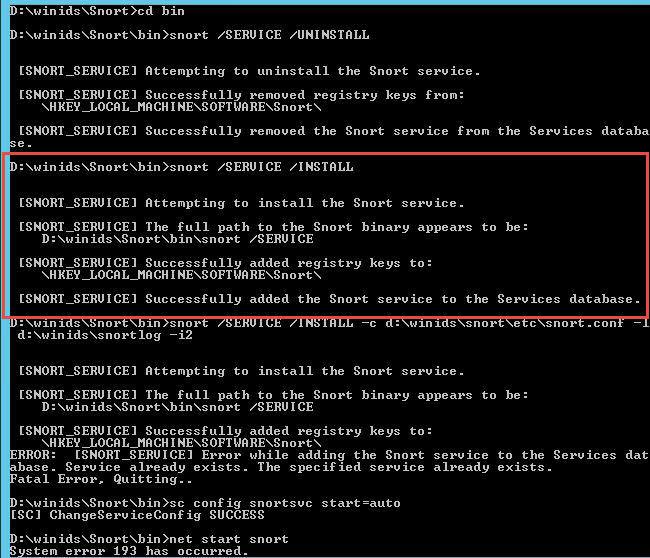
Morpheus replied to scowles's topic in Discussing Manual Installation for IIS with PostgreSQL LoggingOpen a CMD window and type 'cd /d d:\winids\snort\bin' (less the outside quotes), and tap the 'Enter' key. At the CMD prompt type 'snort /SERVICE /UNINSTALL' (less the outside quotes), and tap the 'Enter' key. At the CMD prompt type 'snort /SERVICE /INSTALL -c d:\winids\snort\etc\snort.conf -l d:\winids\snort\log -ix' (less the outside quotes), and tap the 'Enter' key. Note: Make SURE the x above reflects your interface number. At the CMD prompt type 'sc config snortsvc start= auto' (less the outside quotes), and tap the 'Enter' key. At the CMD prompt type 'net start snort' (less the outside quotes), and tap the 'Enter' key. The service should now start...
-
-
Morpheus replied to scowles's topic in Discussing Manual Installation for IIS with PostgreSQL LoggingWhere exactly are you at in the tutorial? What happens: From a open CMD window type 'd:\winids\Snort\bin\snort /SERVICE /SHOW' (less the outside quotes), and tap the 'Enter' key.
-